
When Permafrost quest markers are missing, first read the current quest objective in the Journal and check whether the tracked instruction is updating. The current quest update fixes the tracker failing to update after a language change. It does not establish a universal fix for every missing map pin, and custom map markers can still disappear after relaunching.
Separate a missing display from a stalled quest step. A conversation, reward pickup, or crafting requirement that never registered can leave you waiting for the next destination. In co-op, the host should perform main story steps and Skinwalker quests, so compare the host's Journal before following a guest's missing marker as your only clue.
Read the actual objective before choosing a destination
Open the Journal through the game's menus and identify the active quest. Write down the exact instruction, including the NPC, structure, or item it names. The objective gives you a more useful starting point than the general report that there is no marker.
A quest may still require talking to an NPC or collecting a reward at the location you just visited. Arriving at a destination is different from completing that interaction. Check whether the Journal is asking for another action nearby before walking to a later story location.
Use the following distinctions:
| What is missing or unchanged | Next check |
|---|---|
| The tracked objective stopped updating after a language change | Install the current quest update and compare it with the Journal |
| A destination pin is absent but the objective text remains | Identify the named destination from that text and inspect the display settings available in your installed menu |
| The Journal still requests an earlier conversation or reward | Finish that available interaction before expecting the next destination |
| Only a guest reports missing guidance | Compare the host's saved-world objective |
| A hand-placed map marker vanished after restarting | Treat it as the known custom-marker persistence issue |
This check does not require you to guess the next main quest. Use what your save is actually asking you to do.
Apply the language-change tracker fix
If the failure began after changing the game's language, update the installation before testing it again. The current quest update includes a fix for the tracker not updating in that situation.
After updating, open the Journal and compare the active instruction with the tracked display. Complete only the next available action that the quest requests, then inspect both again. The useful result is that the displayed instruction changes as the quest advances.
Do not repeatedly switch languages as a claimed reset method. The confirmed change is a patch fix for the tracker behavior, not a documented language-toggle sequence that regenerates all quest markers.
If the tracker still shows an older instruction after the Journal changes, capture both states. That specific mismatch is better evidence than a screenshot of the map alone.
Inspect display options without treating them as a save repair
Check the HUD and location-indicator options available in your current Settings menu. Look for an option such as Show Location Indicators if your installed menu provides it, and check its actual effect on the current display. There is no confirmed guarantee here that toggling that option restores every quest pin.
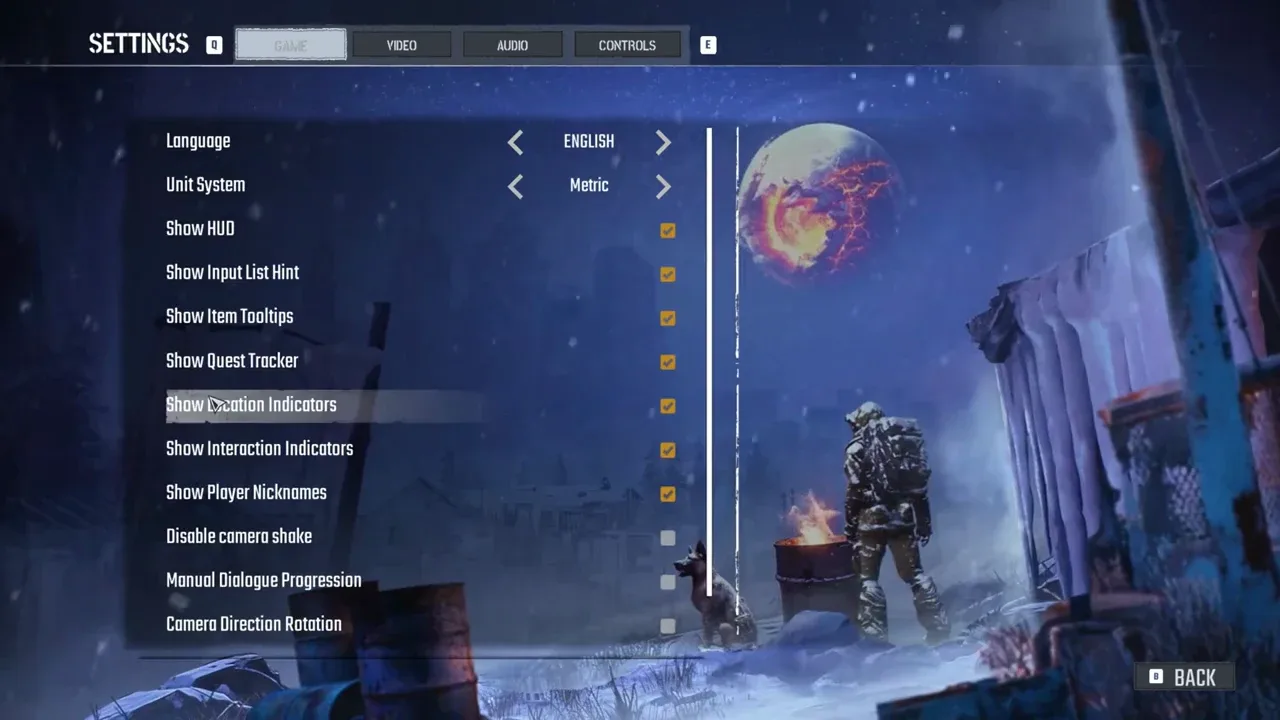
Check the corresponding options available in your installed menu.
If an indicator option is disabled, enable it and inspect the result. If it is already enabled, record that state and return to the Journal check. Do not repeatedly change unrelated graphics or control settings while the actual issue is a quest objective that never registered.
Likewise, confirm that the missing object is a quest destination rather than a custom marker you placed yourself. Those two marker types have different failure evidence. A vanished custom pin after relaunching is currently listed as a known issue; it does not demonstrate that the quest itself was deleted.
Check progression separately in co-op
Have the host inspect the Journal and perform any remaining main-story or Skinwalker interaction. A guest's view is useful evidence, but the host's world is the progression context the group needs to examine.
If a blueprint was taken before its quest activated, or a tower was repaired before High Frequency began, that action may fail to register afterward. A missing next marker in such a save may therefore accompany an unresolved objective. These are specific cases to record, not a reason to assume every missing marker has the same cause.
Do not send the group to a different world to test whether the marker reappears. Characters are world-bound, so that creates a different progression context and cannot show whether the original quest display has recovered.
Keep usable navigation evidence and report the failure
If the Journal still gives a named destination, retain a screenshot of that instruction and your current map before ending the session. A personal note of the named place and action keeps you from relying entirely on a pin that may be missing. This preserves your own reference; it does not alter or repair the game save.
If neither the Journal nor the tracked instruction provides a usable next step, keep the save and report the blocked transition. Include the quest name, exact last completed action, installed version or build if displayed, and whether you are solo, host, or guest. State whether you changed language and whether the problem persists after the current update.
Capture the Journal, tracked HUD text, map, and relevant settings state where available. Include the save and logs through the developer reporting process. The result to verify is guidance matching the quest's current registered step; a pin appearing somewhere on the map is not enough if the objective remains unchanged.
Sources and version notes
Sources checked: 12 October 2026. Verification labels refer to the cited documentation and its stated limits; this site has not independently tested these steps in the game. Compare the information with your installed build.
- Quest Fixes & Steam Invites — Developer patch notice. Scope: Hopes completion fix, legacy glitched saves may await next fix; HighFrequency works while Hopes active.
- Known Issues & Workarounds (Updated October 11) — Developer issue post. Scope: Disappearing custom pins, which are distinct from quest-objective markers.
- Permafrost stuck quests: known bugs and what to try — Community summary. Scope: Oh Deer reward marker empty report; quest vs no-animal spawn distinction.
- Quest Issues & Workarounds (The Way Home and more) — Developer issue post. Scope: Skinwalker dialogue Space / host alone; out-of-order repairs or reward pickup can fail; base radio first.
The Quest Fixes & Steam Invites announcement was published 11 October 2026 (UTC−7) and checked here on 12 October. It supersedes older invitation and affected-quest guidance; the announcement does not establish an exact newest game build.
Language-change tracker fix does not prove erased custom pins or all quest markers restored. Historical Anna interaction report remains secondary.