
If your Permafrost Meet the Leader quest is stuck after speaking with the relevant leader, the current workaround is to skip the leader's dialogue with Space, then inspect the Journal for an updated objective. In co-op, have the host perform the main story interaction. This is a supported attempt, not a guaranteed repair for every save that already failed to advance.
Use the exact quest name, objective, and location shown in your save. The official issue name does not establish a single verified leader or settlement for every report. Do not assume that an opening quest with similar wording, or an old red-tower report, identifies your destination.
Data version: Numerical recipe or quest entries from MetaBot use its 0.44.2.4634-milestone export. This is a source reference, not confirmation that every entry remains available after later patches.
Identify the blocked conversation from the Journal
Open the Journal and read the current instruction. Establish whether it asks you to travel, find a leader, or speak with someone already reached. A completed journey is different from the conversation the quest is waiting for.
Record the quest title, exact instruction, and NPC or place it names. If your Journal still asks for an earlier travel action, complete that displayed step before treating a later conversation as the failure point.
A missing map marker is not enough to identify the leader. Use the text that is actually available in your save. If it gives no usable destination or conversation at all, preserve that state for a report rather than following an assumed route.
Use Space during the relevant dialogue
Approach the leader associated with your active objective and begin the available main-story conversation. Use Space to skip through the dialogue, let the interaction end, and then inspect the Journal. The workaround targets a conversation that does not complete the expected quest transition.
Make the attempt in a clear order:
- Note the current objective.
- Begin the relevant quest conversation.
- Use Space to skip the dialogue.
- Leave the conversation after it finishes.
- Compare the Journal instruction with the state before the attempt.
If no relevant conversation appears, record that separately. A dialogue that can be replayed but does not advance is different from an NPC with no available quest interaction. Pressing Space outside dialogue is not the supported workaround.
Use the Horizon example only for the matching Journal entry
Only if your Journal specifically names Feel The Heat and its Find the leader or Go to Horizon objective, the opening Horizon route applies. In that case, the leader is Robyn at Horizon. Speak with her for that opening story interaction.
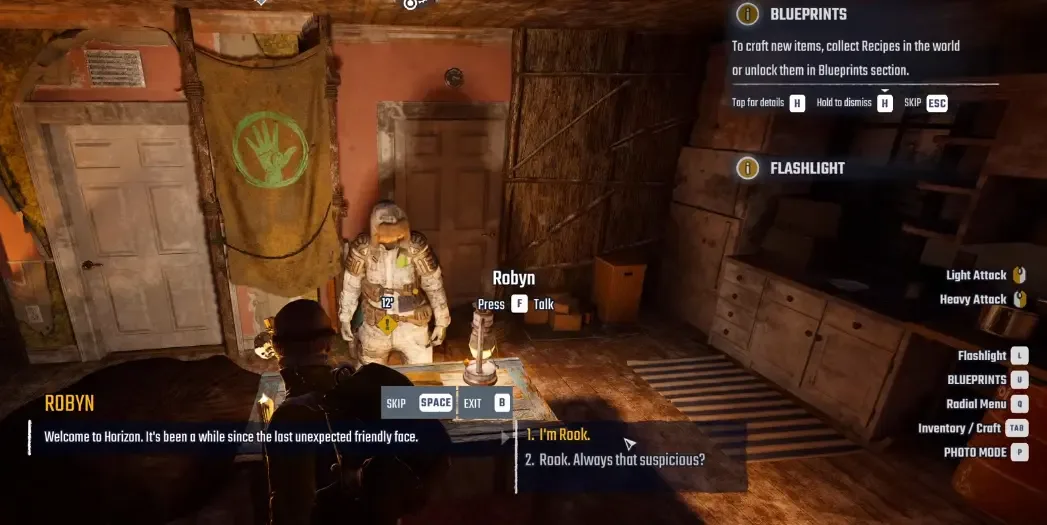
This example applies only when the Journal names the opening Feel The Heat leader objective.
That conditional example does not establish that the official Meet the Leader issue is the same quest. If your Journal names a different task, location, or person, follow that information and do not travel to Horizon because this example exists.
For the matching Feel The Heat sequence, the story continues into Horizon's Kitchen. Seeing that next task is a useful check for the opening sequence only. It is not a universal success banner for every leader conversation.
Have the host perform the story interaction
In co-op, have the host inspect the current Journal and perform the remaining main quest conversation. Compare the host's objective after the attempt before concluding that the whole world is blocked based only on a guest's tracker.
If a guest already performed the dialogue, the host can inspect the remaining interaction and try the supported skip behavior. This follows the current guidance, but it should not be described as a guaranteed reset of an earlier failure.
Keep the check in the same saved world. Characters are world-bound, so entering another host's world produces a different progression context. It cannot demonstrate that the original objective recovered.
Confirm that the conversation registered
The useful result is the requested objective registering and the next instruction becoming available. An NPC animation ending or the dialogue window closing alone does not establish that the story advanced.
If the Journal already requests a follow-up action, perform that instruction instead of continuing to replay the initial greeting. If it remains on the same leader objective after the Space attempt, capture that exact state.
There is no confirmed item, construction, or payment here that forces a missing conversation handoff. Do not spend resources on unrelated tasks in the hope that they will silently complete it.
Preserve the save if the workaround does not help
Keep the existing world when the objective remains blocked. Install the current update and record whether the problem persists afterward. A general quest-fix announcement does not prove that your particular old save is repaired.
Prepare a report with the exact quest title, objective, leader's name, and location. State whether dialogue is available, whether Space was used during it, and whether the host or a guest performed the interaction. Include a screenshot of the Journal after the failed attempt.
Add the installed version or build if displayed by your game or launcher, plus the save and logs through the developer reporting process. Preserve the missing transition between the conversation and the next objective so it can be investigated without guessing which leader or task was involved.
Sources and version notes
Sources checked: 12 October 2026. Verification labels refer to the cited documentation and its stated limits; this site has not independently tested these steps in the game. Compare the information with your installed build.
- Quest Issues & Workarounds (The Way Home and more) — Developer issue post. Scope: Skinwalker dialogue Space / host alone; out-of-order repairs or reward pickup can fail; base radio first.
- Permafrost Story Walkthrough: Main Quests in Order — Data and editorial guide. Scope: A New Beginning tools/fire/cabin/Rope; Feel The Heat Robyn Horizon; Dog Days bandage/raw meat in Bone Cave.
- Co-op Guide: How to Host, Join and Fix Connection Issues :: Permafrost General Discussions — Developer guide. Scope: Host Multiplayer and Join Multiplayer Sessions menus; password/player slots.
MetaBot recipe and quest data is attributed to 0.44.2.4634-milestone (Steam build 25834606). It describes that dataset; availability and requirements after later patches still need to be checked in your game.