
If your Permafrost High Frequency quest is stuck, check three things before doing more repairs: the quest was active when you repaired the tower, you built the radio at your base before repairing the tower radio, and the host performed the main story steps in co-op. The current quest update also allows High Frequency to complete while Hopes and Dreams is active. You no longer need to keep those two quests apart simply because an older guide says they conflict.
A repaired-looking tower is not enough to prove that the quest registered the work. Check the Journal, the renovation counter, and the radio objective separately. Repairing the tower before activating High Frequency can still leave the objective unregistered. There is no confirmed universal repair for every save that already reached this state, so keep your existing world while checking the supported sequence.
Data version: Numerical recipe or quest entries from MetaBot use its 0.44.2.4634-milestone export. This is a source reference, not confirmation that every entry remains available after later patches.
Identify the step that stopped advancing
Start with the exact active objective. High Frequency takes place at Hunter's Glade, where you climb the lookout, talk to Skinwalker, restore the damaged tower, and listen to Icarus. These are separate interactions. Reaching the correct tower does not automatically complete its conversation, and repairing the radio does not replace the remaining structural renovations.
Use this table to choose your next check. It separates an unfinished action from a completed action that failed to register.
| Current situation | Next check | What a useful result looks like |
|---|---|---|
| You reached the tower but have not spoken with Skinwalker | Find him near the upper cabin and finish the radio conversation | The Journal asks for the tower renovation |
| The renovation counter is incomplete | Inspect the cabin and upper walkway with the Building Tool equipped | The remaining blue repair outlines can be identified |
| The tower looks finished but the repair objective remains | Establish whether the repairs happened before High Frequency activated | You can distinguish missing work from a registration failure |
| You repaired the tower radio before building the base radio | Record that order and inspect the current Journal state | You have a clear explanation of the sequence that preceded the blockage |
| A guest performed the story interaction | Have the host inspect and perform any still-available objective | Progress is checked in the host's existing world |
| You hear the wrong message or receive no completion | Check the installed update and the remaining Journal objectives | The required Icarus interaction registers, or the remaining failure is documented |
Do not use the Hopes and Dreams quest title alone as a diagnosis. Its old conflict with High Frequency has received a fix. A save that still fails needs to be examined at the actual blocked step rather than being treated as proof that the old restriction is still in force.
Preserve the base-radio sequence
The important preparation happens before the Hunter's Glade radio repair. Build the radio at your own base first. If you are following the story in order, this belongs to the New Home sequence before the journey to the lookout.
The Radio Station Bench at your base requires 3 Wire and 10 Wood. Wire is the finished material required by the recipe; raw Copper and Copper Ingots cannot replace it. Put the finished materials in your character's inventory, select the Radio Station Bench from Utilities, and place it in a valid construction position. If furniture blocks the preview, clear enough space for the bench.
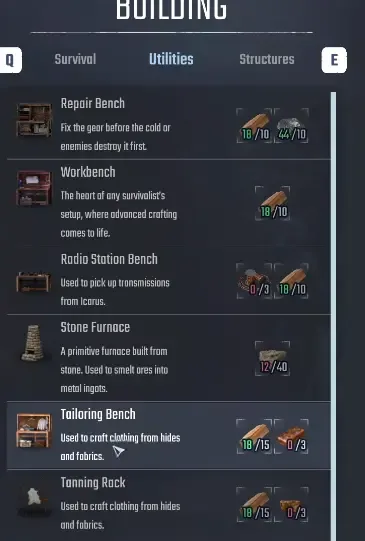
The base radio is a construction entry; the tower radio uses a renovation interaction.
After constructing the base radio, approach it and listen to the available transmission. Let the message finish before leaving. The journey then continues toward Hunter's Glade through The Outpost. This is the preparation to preserve before repairing the lookout radio, not an instruction to place another radio beside the damaged tower equipment.
If the base radio is already built, do not assume that reconstructing it will repair a quest flag that failed earlier. The supported advice establishes the order for a run that has not yet crossed the problem point. It does not establish a retroactive cure for a tower that was repaired first.
Before the group travels, agree on who will perform the story actions. In co-op, the host should do them. Guests can help with supplies, but the host should retain control of the conversation and the quest-specific repairs so the group's next attempt follows the current guidance.
Activate High Frequency before renovating the lookout
Continue to Hunter's Glade and check that High Frequency is active. The Outpost is the approach objective that leads into this section. Climb the steel lookout and find Skinwalker near its upper cabin. Speak with him about the radio equipment before treating the blue construction outlines as a repair checklist.
Read the Journal after the conversation. The goal is to confirm that the game is asking you to renovate this tower now. That check matters because repairing it before High Frequency activates is a known way for the work to fail to register later.
If you have not repaired anything yet, this is the point to pause and verify the quest state. If you already repaired the entire lookout during exploration, note that fact before attempting unrelated repairs elsewhere. A completed structure and an active quest with an incomplete repair objective are different pieces of information.
The relevant tower is the Hunter's Glade lookout involved in Skinwalker's conversation. Do not travel to Anna's church roof or Finn's improvised tower to solve this renovation step. Those are later communication locations and cannot substitute for the objective at this lookout.
Complete all thirteen tower repairs
Equip the Building Tool and inspect the lookout's upper cabin and surrounding walkway. The damaged components appear as blue repair outlines. The full renovation counter requires 13 repairs, including structures and equipment; the damaged Radio Station Bench is only part of that total.
Work around the area in a consistent order:
- Inspect the cabin interior and approach each blue outline to read its requirements.
- Repair the original damaged component shown by the outline.
- Check the renovation counter after the repair.
- Continue around the upper walkway and the outside of the cabin.
- Recheck less obvious outlines if the counter remains below 13/13.
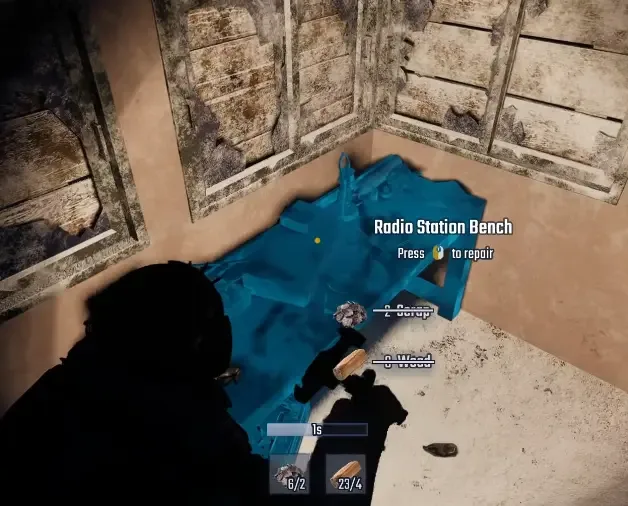
Inspect the original blue repair outline, then check the full tower renovation counter.
The repair targets include damaged walls, windows, a Bed, and the Radio Station Bench. Do not stop after the radio looks usable. A missed component inside the cabin or along the walkway can leave the overall renovation unfinished.
Placing a new structure nearby is also different from repairing the highlighted original. If you built a replacement wall or another bench but the counter did not move, return to the quest's damaged outline and inspect that object directly. The appearance of the area can change without satisfying the required renovation interaction.
Read each material prompt rather than assuming every repair has the same cost. Wood can be gathered from trees around Hunter's Glade. Scrap for the repairs can come from supplies brought along the road or salvage gathered around Bunker Checkpoint. There is no verified single total for every tower component in this guide, so use the displayed requirements to finish the remaining work.
When the counter reaches 13/13, inspect the Journal again. This distinguishes a completed renovation from a remaining transmission objective. If the counter is full and the quest still requests renovation, capture that mismatch; collecting additional Wood will not by itself explain it.
Listen at the restored radio and check the handoff
Once the repairs are complete, use the restored Radio Station Bench at the lookout. Listen to the transmission from Icarus and allow it to finish. Then speak with Skinwalker again if the current objective calls for that conversation.
The successful route continues into The Way Home. That next quest is a useful confirmation that the story has moved beyond High Frequency. A working radio model, an audible recording, and the next quest appearing are separate observations; check the last of those before leaving on a long journey.
If the radio plays but the Journal does not change, record the active objective and which message played. Older reports described a Hopes and Dreams message repeating instead of the required Icarus transmission. The current update addresses completing High Frequency while that side quest is active, so install the current update before relying on those older reports.
There is no supported button sequence here that forces a previously missing quest flag to regenerate. Repeating the same radio interaction without checking the Journal gives you little new information. Make one clear attempt following the current objective, then use the resulting state to decide whether you still have unfinished work or an unresolved save problem.
Let the host perform the remaining story interactions
In a cooperative world, the host should perform the main story steps and Skinwalker quests. If a guest repaired the equipment or led the conversation, have the host inspect whatever interactions remain available in the same world. The aim is to follow the supported role assignment, not to promise that another conversation will repair every earlier failure.
Compare the host's Journal with the blocked action. A guest's experience alone may not establish the state of the host's story progression. Note who spoke with Skinwalker, who repaired the radio, and whether both players saw the same objective afterward.
Keep using the same host world when resuming. Characters are tied to a world, and joining a different world does not continue the same saved progression. A new session in the existing world is a clearer test than moving the group into another world and then comparing unrelated quest states.
Stop the retry loop when the save remains blocked
If the quest was active, the base radio came first, the full tower renovation is complete, and the host performed the available story interactions, a remaining blockage needs a save-specific report. Keep your existing world rather than discarding progress on the assumption that a restart is required.
Record the quest name, exact objective, installed game version or build as shown by your installation, and whether you play alone or as a host or guest. Add the order in which the base radio, quest activation, tower repairs, and transmission occurred. Screenshots of the Journal and completed renovation counter are more useful than saying only that the tower is broken.
When reporting through the game's Bug Reporting area, include the save and logs using the developer upload process. State whether the problem existed before you installed the current quest update. This gives the team enough context to distinguish an old registration failure from a new attempt that still does not advance.
A complete result is the story handoff after the required tower transmission. If that result does not occur, leave the save intact and report the specific remaining step. The current fix removes the old need to separate Hopes and Dreams, but it does not justify claiming that every historically blocked High Frequency save is repaired.
Sources and version notes
Sources checked: 12 October 2026. Verification labels refer to the cited documentation and its stated limits; this site has not independently tested these steps in the game. Compare the information with your installed build.
- Quest Issues & Workarounds (The Way Home and more) — Developer issue post. Scope: Skinwalker dialogue Space / host alone; out-of-order repairs or reward pickup can fail; base radio first.
- Quest Fixes & Steam Invites — Developer patch notice. Scope: Hopes completion fix, legacy glitched saves may await next fix; HighFrequency works while Hopes active.
- The Outpost and High Frequency Walkthrough for Hunter’s Glade — Guide with attributed gameplay. Scope: 13 damaged tower pieces /13-of13 renovation; base RadioStationBench recipe and climb context.
- Professional Smelter – Recipes (Permafrost) — Extracted game data. Scope: QualityMetal Professional recipe2 IronIngots+2 Scrap,10s; building point cost0; does not establish two one-point material recipes.
MetaBot recipe and quest data is attributed to 0.44.2.4634-milestone (Steam build 25834606). It describes that dataset; availability and requirements after later patches still need to be checked in your game.
The Quest Fixes & Steam Invites announcement was published 11 October 2026 (UTC−7) and checked here on 12 October. It supersedes older invitation and affected-quest guidance; the announcement does not establish an exact newest game build.